ESPHome is developed in the open on GitHub. Every component, every release and every fix starts there, and the repository is also where you can download the source code directly, including the development branch archive linked from this site. This guide explains how the repository is organised, how its branches relate to the versions you install, and how to use a source download responsibly, whether you want to read the code, test an unreleased fix or contribute your own component.
The repositories that make up ESPHome
The project spans several repositories under the esphome organisation on GitHub. The ones most people encounter are:
- esphome/esphome: the main repository. It contains the Python command-line tool, the YAML validation schemas, the code generator and the C++ runtime for every component.
- esphome/esphome-docs (and the newer documentation site sources): the content behind esphome.io, including every component page and its examples.
- esphome/home-assistant-addon: the packaging that turns ESPHome into the Device Builder app for Home Assistant.
- esphome/esp-web-tools and esphome/esphome-web: the browser-based flasher behind ESPHome Web.
- esphome/firmware: ready-made starter configurations, such as the images used for first-time preparation and Bluetooth proxies.
- esphome/issues and esphome/feature-requests: where bugs are reported and new ideas discussed.
When people say "the ESPHome GitHub", they almost always mean esphome/esphome.
Branches and how they become releases
The main repository uses three long-lived lines of development.
| Line | Branch or tag | What it contains | Who should use it |
|---|---|---|---|
| Development | dev | Every merged pull request, immediately | Contributors and testers |
| Beta | beta | A release candidate, frozen roughly a week before release | Users willing to test |
| Stable | release and version tags such as 2026.11.0 | The published release | Everyone else |
New work is merged into dev continuously. Around the end of each month, the maintainers cut a beta from dev, invite testing, fix what turns up, and then publish the stable release. Patch releases such as 2026.11.1 and 2026.11.2 follow with bug fixes during the month.
The same lines map onto the distribution channels. PyPI receives stable and beta releases (betas are marked as pre-releases, so a normal pip install ignores them). The Docker image has stable, beta and dev tags. The Home Assistant app has a stable version and a separate beta app.
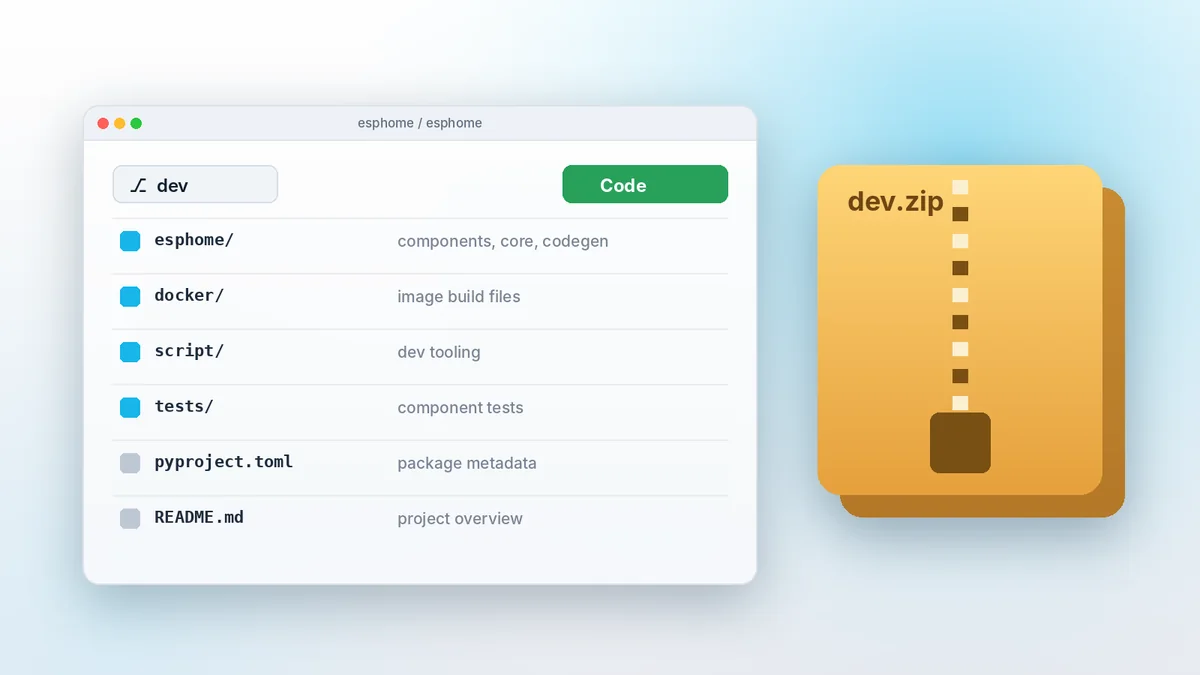
What the dev.zip download contains
The download offered on this site points to GitHub's automatic archive of the dev branch:
https://github.com/esphome/esphome/archive/refs/heads/dev.zipGitHub generates this file on demand. It is a snapshot of the branch at the moment you click, without Git history. Extracted, it produces a folder named esphome-dev with the full source tree:
esphome/: the Python package. Inside it,components/holds one folder per component, each with a Python file describing the YAML schema and code generation, and C++ files for the device side.esphome/core/: the C++ core shared by all devices, including the main loop, scheduler and logging.esphome/dashboard/: the server code for the web dashboard.docker/: files used to build the official container images.script/: helper scripts for development, formatting and testing.tests/: test configurations for components and unit tests for the Python code.pyproject.tomlandrequirements*.txt: package metadata and dependencies.
The archive does not include compiled firmware, toolchains or the documentation site. Toolchains are downloaded automatically the first time you build for each platform.
When a source download is the right choice
For most people, the stable package is the correct way to run ESPHome. A source download from the dev branch is useful in a narrower set of situations:
- Reading how a component works. If a sensor behaves unexpectedly, its C++ implementation shows exactly how readings are taken and filtered.
- Testing a fix that has been merged but not released. A maintainer may ask you to confirm that a bug is resolved on
devbefore the next release. - Offline review or archiving. Some organisations keep a snapshot of the source they rely on.
- Starting development. Although cloning with Git is better for ongoing work, an archive is a quick way to explore the layout.
Because dev changes daily, it can contain incomplete work or temporary breakage. Do not use it for devices you depend on, such as heating controllers or door locks, unless you are deliberately testing.
Installing ESPHome from the source archive
Running ESPHome from source uses the same Python tooling as a normal install. Work inside a virtual environment so the development version never mixes with a stable install.
unzip esphome-dev.zip
cd esphome-dev
python3 -m venv .venv
source .venv/bin/activate        # Windows: .venv\Scripts\activate
pip install --upgrade pip
pip install -e .
esphome version
The -e flag installs the package in editable mode, so any change you make to the source takes effect immediately without reinstalling. The version string reports a development version, which makes it obvious which ESPHome you are running.
Python 3.12 or newer is required, matching the stable releases. From here, every normal command works: esphome run, esphome dashboard, esphome logs.
To go back to the stable release, deactivate this environment and use your normal installation. Nothing in the source folder affects other environments.
Cloning with Git instead
If you plan to update the source regularly or contribute changes, clone the repository rather than downloading an archive:
git clone https://github.com/esphome/esphome.git
cd esphome
git checkout dev
python3 -m venv .venv
source .venv/bin/activate
script/setup
The script/setup helper installs ESPHome in editable mode along with the development and testing dependencies, and sets up pre-commit hooks that format code the way the project expects. Updating to the latest dev is then a single git pull.
Using the dev branch without installing anything
There are two lighter ways to try development builds.
The dev Docker image. Pull ghcr.io/esphome/esphome:dev and run it with a copy of your configuration folder. It is rebuilt from the dev branch regularly. Use a separate folder so stable and dev builds never share caches.
External components from GitHub. ESPHome can pull a single component from any Git repository or pull request without changing the rest of your installation:
external_components:
  - source: github://pr#12345
    components: [ ld2450 ]
This compiles your normal stable ESPHome with that one component replaced by the version from the pull request. It is the cleanest way to test a specific fix, because everything else stays on the stable release. When the fix ships in a release, remove the block.
The same mechanism loads community components that are not part of ESPHome at all:
external_components:
  - source:
      type: git
      url: https://github.com/example/esphome-custom-sensor
      ref: main
Review third-party component code before using it. It is compiled into your firmware and runs with full access to the device.
Finding your way around a component
Each folder under esphome/components/ follows a consistent layout. Taking a temperature sensor as an example:
__init__.pyorsensor.pydefines the YAML schema with thevoluptuous-based validation helpers ESPHome uses, and generates C++ code from the validated configuration.*.hand*.cppfiles implement the component on the device, usually as a class derived fromPollingComponentorComponent, withsetup()andupdate()orloop()methods.CODEOWNERSentries in the repository root show who maintains the component and is likely to review changes.
Reading these files answers questions the documentation does not, such as the exact order of operations during setup, default timing values or how errors are reported.
Reporting issues effectively
If a component misbehaves, the issue tracker is the right place, but a useful report needs a few things:
- The ESPHome version, from
esphome versionor the dashboard. - A minimal configuration that reproduces the problem, with secrets removed.
- Logs from boot through the failure, at
DEBUGlevel or higher. - The board and framework in use, since many issues affect only ESP-IDF or only Arduino builds.
- Whether it happens on
dev. If you can test the dev branch and the bug is gone, say so; it may already be fixed.
Search existing issues first. Many problems have been reported, and adding a confirmation with your details to an existing issue helps more than opening a duplicate.
Contributing a change
The contribution workflow follows standard GitHub practice, with some project-specific expectations:
- Fork the repository and create a branch from
dev, not fromrelease. - Keep pull requests focused on one change.
- Include a test configuration under
tests/components/<name>/so continuous integration can build the component for each supported platform. - Update the documentation in the docs repository when you add or change options.
- Expect review comments. Maintainers look for consistent naming, sensible defaults and code that does not block the main loop.
Continuous integration builds every changed component for ESP32, ESP8266, RP2040 and other platforms where it applies. A pull request with failing checks will not be merged until they pass.
Licensing in practice
ESPHome uses two licences. The Python side, including the command-line tool, code generator and dashboard, is released under the MIT licence. The C++ runtime that is compiled into device firmware is released under GPLv3. In practice this means you can use ESPHome freely for personal and commercial projects, but if you distribute devices running modified ESPHome firmware, the GPLv3 obligations for that C++ code apply.
Verifying what you download
GitHub's archive links are generated over HTTPS directly by GitHub, which protects the download in transit. For stronger assurance:
- Prefer tagged releases over branch archives when you need a reproducible snapshot; a tag always points to the same commit.
- Compare the commit hash shown on the GitHub page with the one reported by
git login a cloned copy. - Install production systems from PyPI or the official container registry, where release builds are produced by the project's automated pipelines.
Following development without running it
You do not have to install the development branch to benefit from it. Watching the repository is a good way to know what is coming:
- Release notes on GitHub and the changelog on the documentation site list every merged change for each version, grouped into new components, breaking changes and fixes.
- The beta period each month is the best time to test your own configurations. Install the beta Device Builder app or the
betaDocker tag on a spare machine, compile your files, and report anything that fails before the stable release ships. - Pull requests labelled for a component you rely on show upcoming behaviour changes. Subscribing to one keeps you informed without reading the whole repository.
- Discussions and the community forum explain the reasoning behind larger changes, such as framework defaults or renamed options.
This approach gives most of the advantages of tracking dev, early warning about changes that affect your devices, without risking a broken build on a device you depend on.
Keeping a source snapshot useful over time
If you download the dev archive to read or archive the code, note the date and the commit it came from. GitHub shows the latest commit at the top of the branch page; record its short hash alongside the archive. Without that reference, it becomes impossible to tell later which version of a component you were reading, and comparisons with newer releases turn into guesswork.
For long-term reference, prefer downloading the archive of a specific release tag, such as 2026.11.0. Tag archives never change, so the same link always produces the same files, which also makes them easier to cite in notes or issue reports.
Working offline with a source snapshot
A source download is not enough on its own to build firmware without an internet connection. The first compile for each platform still downloads compilers, framework packages and libraries. If you need offline builds, for example on an isolated network, compile each platform you use once while online. The downloaded tools are cached in your user profile and the build folder, and later compiles can reuse them as long as the configuration does not request new libraries.
Frequently asked questions
Is the dev.zip download the same as the pip package?
No. The pip package is a built release published to PyPI. The dev archive is raw source from the development branch, which may include changes that have not been released or fully tested yet.
Can I flash devices with firmware built from the dev branch and then go back to stable?
Yes. Firmware built from any branch installs the same way. To return to stable, compile the configuration with your stable installation and install it over the air. Check the stable release notes, because options added on dev may not exist in the stable version yet.
Key takeaways
esphome/esphomeon GitHub holds the tool, the components and the device runtime.devreceives every merged change;betaand stable releases are cut from it each month.- The dev.zip archive is a source snapshot, useful for reading code and testing unreleased fixes, not for everyday devices.
- Install source in a separate virtual environment with
pip install -e ., or clone with Git for ongoing work. - External components let you test a single pull request while keeping everything else stable.